Invoices to members, families and sponsors
The annual fee as a batch invoice to all members at once, plus course fees and sponsorship invoices. With Swiss QR code, automatic reminders and automatic payment matching. Sent by email or A-Post to the member or family.
Annual Fees for All Members in One Run
For most clubs, the annual membership fee is the biggest item in the budget, and collecting it costs the treasurer the same evenings every year: Excel list, mail merge, payment slips, then manually ticking off who has paid. The batch invoice turns this into a single run. You set an amount per list, for example for active members, youth and honorary members, and each member receives the amounts for the lists they are on in one invoice. A separate invoice is created for each member with its own Swiss QR code and its own reference number, 300 of them in just a few seconds.
Families can receive one joint invoice instead of four individual ones if you like. Before anything goes out, you send yourself a test run and see each invoice exactly as the member will receive it. Only then is it sent to everyone by email or A-Post. Because each invoice has its own reference number, the bank import in club accounting later assigns incoming payments automatically, and anyone who has not paid after the deadline receives the reminder without you having to do anything.
All invoice types for everyday club life
Every invoice gets a Swiss QR code, reminders run automatically, and every payment is posted in the club accounting.
Batch Invoices for the Annual Fee
The annual membership fee for everyone in one go: set one amount per list, such as for active members, youth and honorary members. A separate invoice is created for each member with its own QR code, with families bundled if you like. 300 fees in just a few seconds.
Subscription invoices for membership fees
Annual or quarterly fee as a subscription with an interval, per member from the date they join. The platform automatically creates the invoice from the template for each period.
Individual invoices
For individual cases: invoice with multiple items such as equipment or club camp, VAT per line and Swiss QR code automatically. A test send to yourself shows you in advance exactly the email the member will receive.
Event invoices
Participation in events is invoiced automatically, with price variants per category. No Excel rework after the event.
Course invoices
Course fees are created directly from the course registration: everyone taking part gets the invoice, automatically per course or course series.
Sponsoring invoices
Invoices for sponsors are created automatically from sponsoring packages, including delivery to the company by email or post.
Recommended by
 Tesla Owners Switzerland
 TSV Rohrdorf
 Altpfadi Adler Aarau
 Kunst- und Geräteturnen Kleindöttingen
 Radfahrerverein der Stadt Winterthur
 Turnverein Eien-Kleindöttingen
 Schwingerclub Rothenburg
Club invoices at a glance
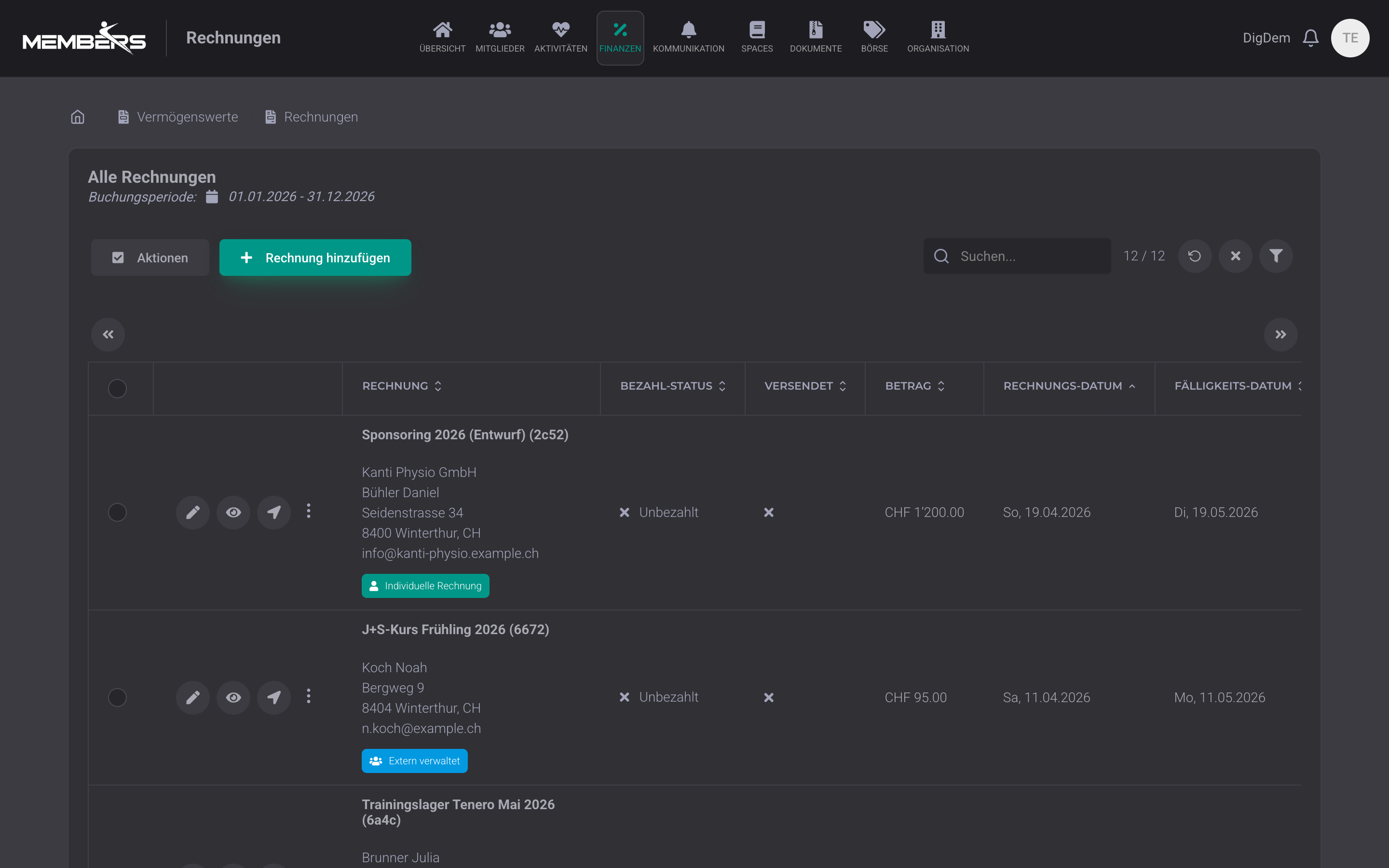
All invoices at a glance: filter by payment status (open, paid, reminder), recipient, amount or due date. Each row shows the current status and whether the invoice has already been sent to the member by e-mail or A-Post. The treasurer sees at a glance where the club's money is tied up.
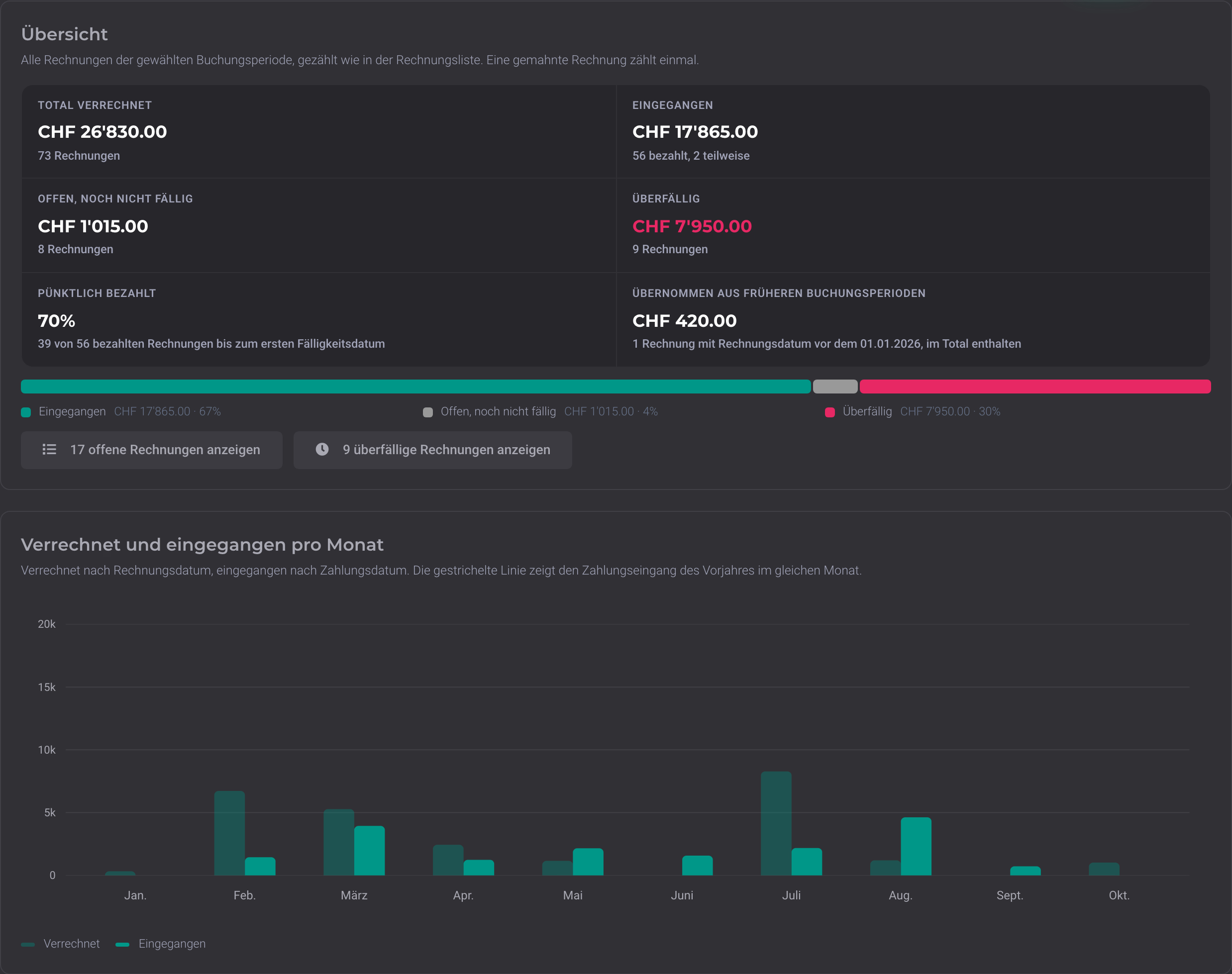
Open and overdue invoices at a glance
The analytics show how much you have invoiced, what has been received, and what is still open or overdue. You can see who owes the most, how many days amounts have been open, and how many reminded invoices were paid afterwards. With one click, you open exactly the overdue invoices and send targeted reminders. Before the committee meeting, you have the figures together without scrolling through a list.
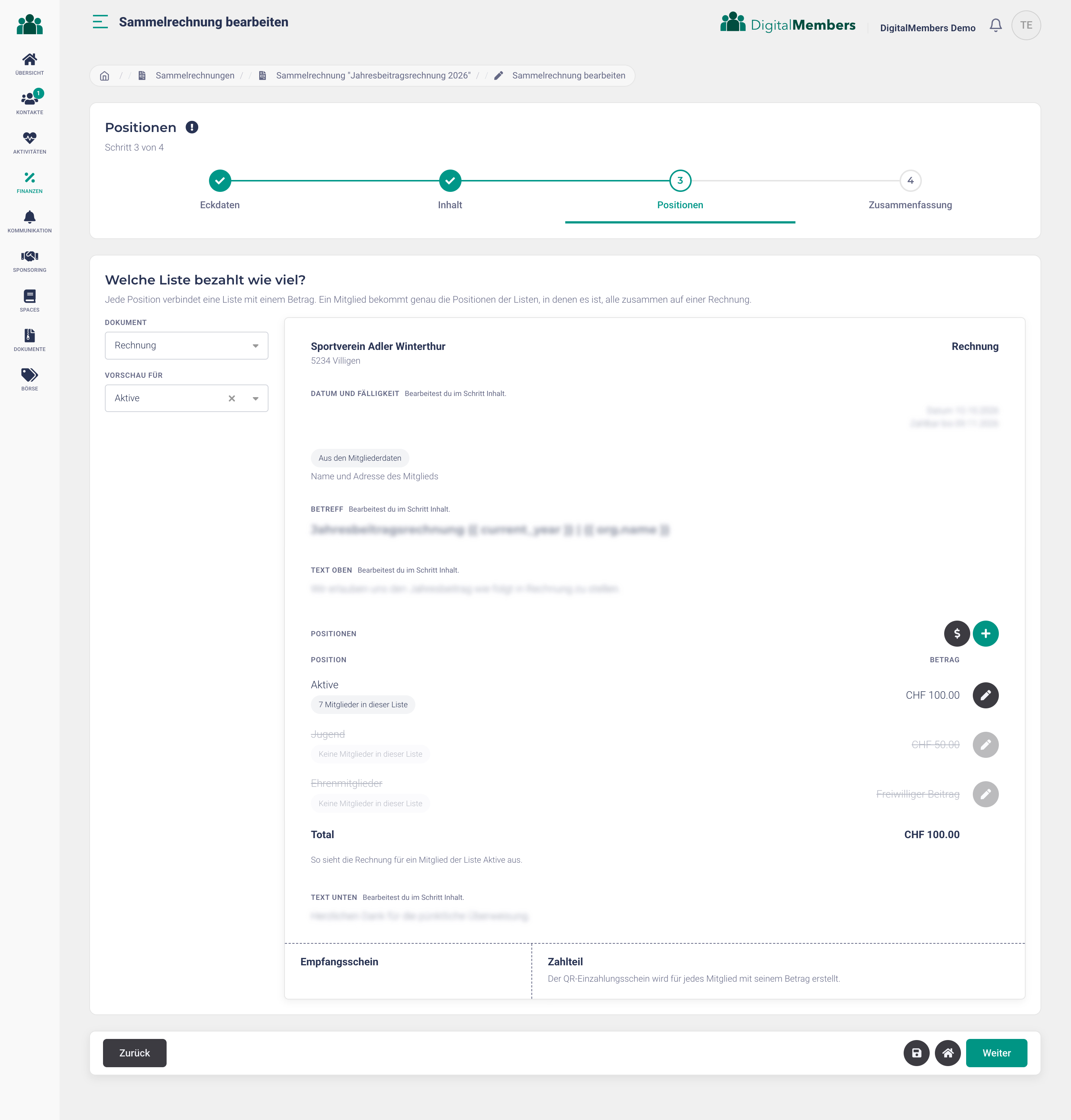
Batch invoice: each list with its own fee
A wizard guides you to the finished batch invoice in four steps: choose a template, adjust texts, set the amount per list, review. With the preview for one list, you immediately see which items a member of that list gets and what they pay in total.
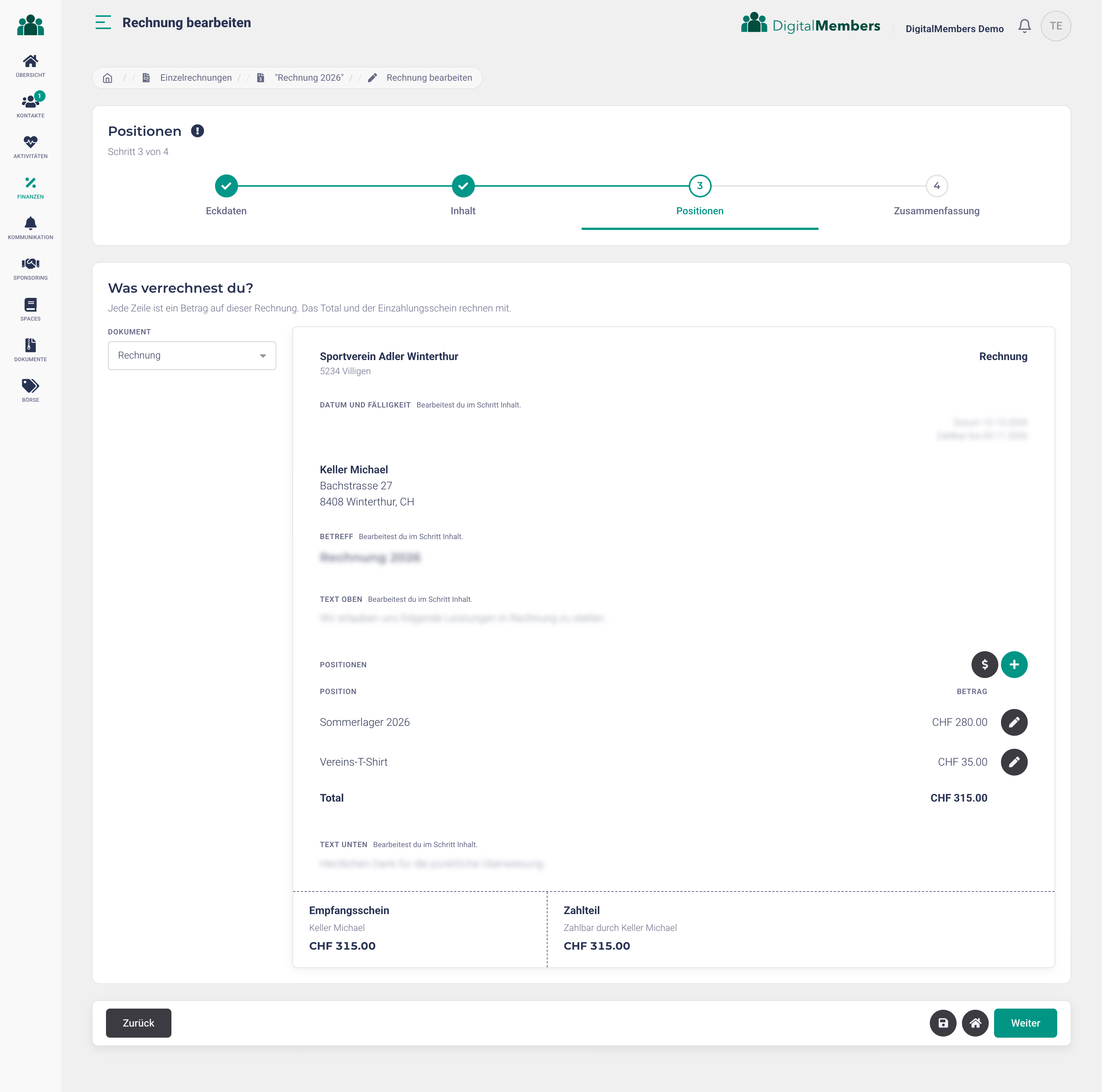
Create an individual invoice directly on the preview
You create the individual invoice directly on a preview that looks like the invoice the member will receive: recipient with address, texts, items and QR payment slip. Each item has its own text and amount, with VAT and revenue account if you like, and the total and payment slip update immediately. This way, one invoice can also cover camps, equipment and fees in a single document.
Multiple invoice templates in your layout
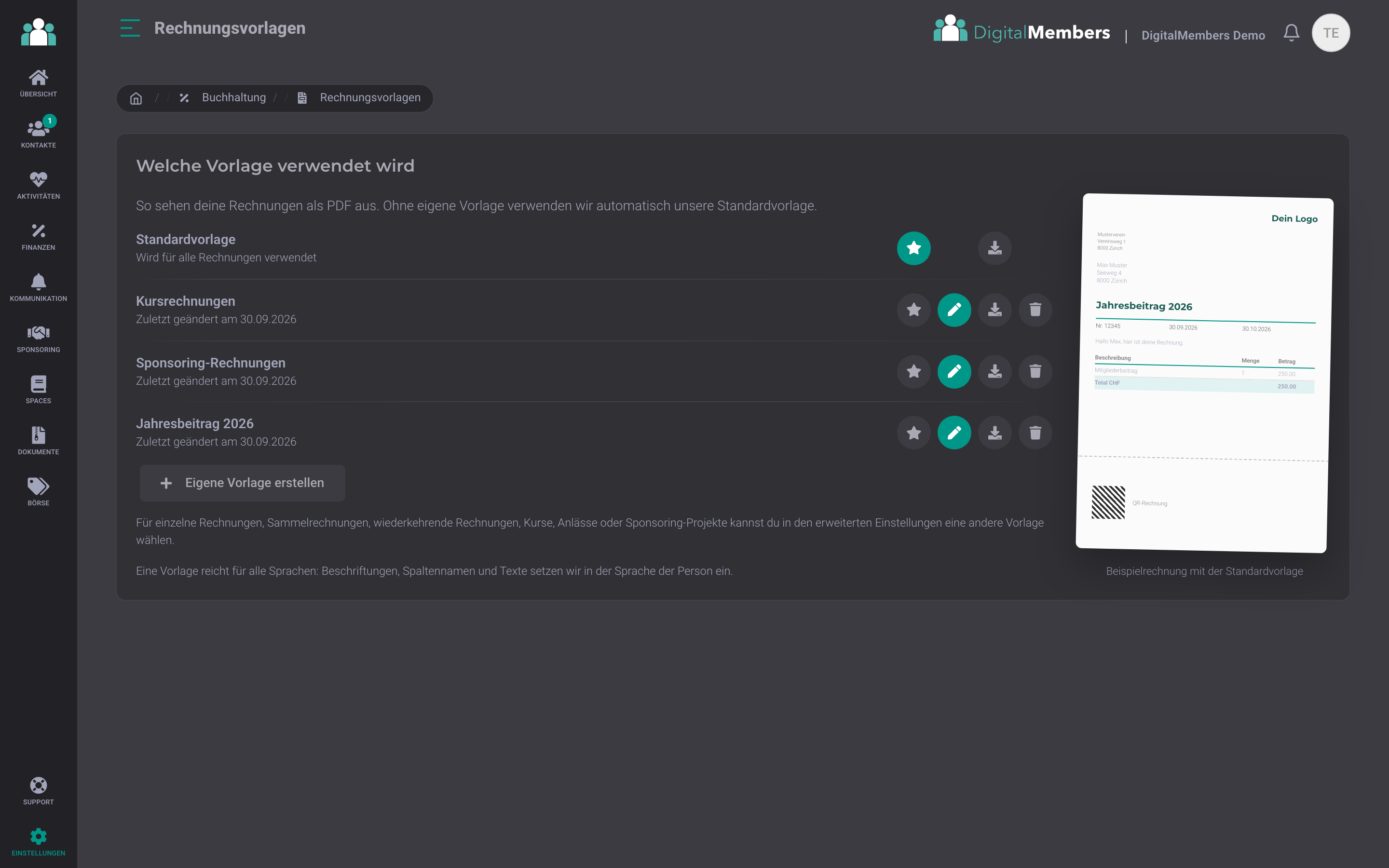
Without your own template, your invoices get our standard layout with a Swiss QR payment slip. If the invoice should use your logo, your font, and your colors, you adjust our Word template and upload it again. An assistant guides you through it in three steps. You can also store as many additional templates as needed, for example for course invoices, for sponsors, or the annual membership fee, and select them in the advanced settings of the relevant invoice. One template is enough for all languages: labels and texts appear in the member's language.
Swiss QR invoice generated automatically
Every invoice automatically gets a Swiss QR code with IBAN, amount, reference number and recipient details. The member scans it with their banking app or at a Post kiosk. QR-IBAN with ESR reference is also supported.
Automatic reminders without chasing
Automatic reminder flow per invoice. After the payment deadline passes, the platform sends the first reminder, then the second, with your own text and subject. Especially useful for annual fees or course fees. Pauses as soon as a payment is received.
Payment status and automatic reconciliation
Payment status per invoice: open, paid, partially paid, or overpaid. Payments from the club account are automatically posted to the right member based on the QR reference. Every status change is logged with timestamp and trigger for treasurers and auditors.
Send by email or A Mail
Send by email with PDF attachment or by A Mail via the integrated postal service. One click decides per invoice or per recipient which channel fits. Email for active members, A Mail for patrons without an email address.
VAT per line item
VAT can be selected individually per item. Many club services are exempt from VAT, but some activities, such as hospitality or a shop, are not. The correct VAT breakdown and your VAT number appear automatically on the invoice.
Templates for contributions and course fees
Invoice templates for recurring membership fees and charges. Set up once (annual fee active members, youth fee, beginner course fee), select as a base per member, and only adjust individual exceptions.
Frequently Asked Questions
- How do I invoice all members for the annual fee?
- Via a batch invoice. A wizard guides you through four steps: choose a template, for example the annual membership fee invoice, adjust texts and set the amount per list, such as for active members, youth and honorary members. This creates a separate invoice for each member with its own Swiss QR code, bundled per family if you like. Before sending by email or A-Post, you send yourself a test run and see each invoice exactly as the member will receive it.
- How do subscription invoices for membership fees work?
- Subscription invoices cover typical club cases: annual membership fee, quarterly course fee, monthly sponsoring contribution. Start and end date per subscription, interval weekly, every 14 days, monthly, or annually. A child invoice is created for each period, which you can still adjust before sending.
- Do you offer a portal for recurring payments?
- Yes. You manage recurring membership fees and annual licences in the licence module of the member management: define the amount and interval once, assign them to members, and the invoices run automatically at the selected interval. If a membership is cancelled, the licence ends on the stored end date, and when members leave, they see their active licences directly in the leaving form.
- Are reminders sent automatically?
- You configure reminder levels once (number of days, fee, text). After that, reminders run automatically. Every day the system checks open invoices and sends them if needed. You can manually pause any sending per invoice.
- How many line items can an invoice have?
- No limit on the number of line items per invoice. Any number of items per invoice with different VAT rates. For donation invoices and small amounts, there’s a free-amount mode where the member can choose the amount themselves (e.g. supporter contribution from CHF 50).
- Can I record credit notes or refunds?
- Yes. You create credit notes as an invoice with a negative amount, for example for a refund due to a course cancellation or a reduced fee. Overpayments are also detected and flagged for clarification.
Membership fees that collect themselves
One-off, subscription, and collective invoices with Swiss QR, automatic reminders, and automatic payment reconciliation. Directly for the members and families in the system.
Try for free